

Epostechnologies diverse kiosk portfolio offers various models, thoughtfully engineered to address specific aesthetic preferences and functional requirements across various industries and applications. From the simplicity and ergonomic excellence of our A Model to the industrial durability of our P Model, each design represents a tailored solution that balances visual appeal with operational performance to meet your unique business objectives.
Select a kiosk around the user task, touch requirements and peripherals. Installation space, user reach and cable routing affect the setup. For a quotation, specify the intended application, device quantity and required connections.



1280 x 1024
500 cd/m²
Full HD
Key Features
Sustainable & Future-Proof Technology
Easy Installation and Maintenance
Slim and Scalable Design
High-Impact Visual Performance
Professional-Grade Performance and Reliability
Versatile Applications, Endless Opportunities
General Overview
Ergonomic Precision – Designed for Comfort
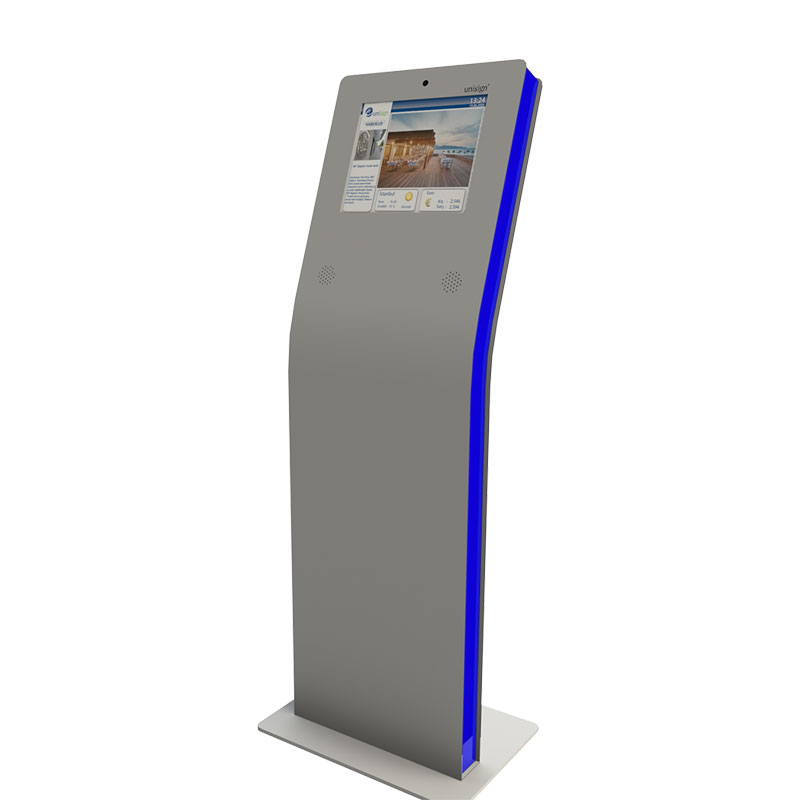
The B Model revolutionizes user interaction through its thoughtfully angled screen design that naturally accommodates user posture and viewing angles. This ergonomic enhancement reduces strain and fatigue during extended use, making it ideal for applications requiring prolonged user engagement such as detailed product catalogs, comprehensive service directories, or complex form completion processes.
Inclusive Design – Accessibility for Everyone
Enhanced accessibility defines the B Model’s core philosophy, with its backward-tilted screen positioning that accommodates users of varying heights and physical abilities. This inclusive design approach ensures comfortable interaction for elderly users, individuals with mobility challenges, and users who prefer seated operation, expanding your audience reach and improving overall user satisfaction.
Clarity in Every Light – Perfect Visibility Anywhere
The B Model’s optimized viewing angle eliminates screen glare and reflection issues commonly encountered in brightly lit environments, ensuring clear visibility throughout the day. This feature proves particularly valuable in retail settings, airports, and outdoor installations where lighting conditions vary significantly, maintaining consistent user experience regardless of environmental factors.
Natural Interaction – Engagement Made Effortless
Superior user engagement results from the B Model’s intuitive screen positioning that encourages natural interaction patterns and reduces hesitation in first-time users. The comfortable viewing angle promotes longer engagement times and higher completion rates for interactive processes, directly contributing to improved customer satisfaction and operational efficiency.
Invest in Comfort – Built for Long-Term Success
Invest in the B Model when user comfort and accessibility are paramount to your application’s success. This model excels in environments where extended interaction periods are expected, diverse user demographics must be accommodated, and optimal viewing conditions are essential for effective communication and engagement.
Technical Specifications
Display LCD
LCD Technology | Resolution | Active Display Area | Brightness | Contrast Ratio | Viewing Angle | Response Time |
|---|---|---|---|---|---|---|
TFT-LCD | 1280x1024 | 337.92(W)×270.336(H) mm | 500 cd/m² | 1000:1 | 89/89/89/89 | 30 (Typ, Tr+Td) |
Touch Screen
Touch Technology | Touch Points | Interface |
|---|---|---|
Projected Capacitive | 10 | HDMI, DVI, VGA |
Power
Power Requirement | Power Consumption (Avg.) |
|---|---|
AC 100 - 240 V~ (+/- 10 %) 50/60 Hz | 20W |
Operations
Operation Life | Operating Temperature | Storage Temperature | Humidity |
|---|---|---|---|
7/24 Working Conditions | 0 ~ 50 °C | - 20 ~ 60 °C | 10 ~ 80% |
Frequently asked questions
What are the key specifications of B Model 17inch?
The model specification lists Resolution: 1280×1024; Brightness: 500 cd/m². Include the model code and selected screen size when ordering, as other options in the same series may have different specifications.
How should the kiosk installation space be planned?
Consider enclosure dimensions, user reach and circulation space together. Plan power, network and peripheral cable routes; the mounting surface and maintenance access must suit the selected model.
How can I clarify the order scope?
Provide the product code, quantity, installation location and intended equipment. Ask for accessories, fixings, software and installation requirements to be identified separately in the quotation.
How should content resolution be selected for B Model 17inch?
The model specification lists a resolution of 1280×1024. Prepare the content pixel dimensions and aspect ratio for this value; use a suitable layout rather than stretching artwork with a different shape.
What should I verify for kiosk peripherals?
List the printer, reader, computer or payment terminal required by the workflow. Check each component’s physical fit, connection, power requirements and application support.
What should be tested when receiving a kiosk?
Test the display, touch response, network connection and any selected peripherals with the intended application. Check that users can start and finish the main task and use cancel and help actions.
Application Images








Reviews
There are no reviews yet.